Data Storage
JTrack stores smartphone, wearable, and EMA data using a structured, BIDS-inspired organization. Data is grouped by study, participant, and data source, facilitating longitudinal analyses and reproducible research.
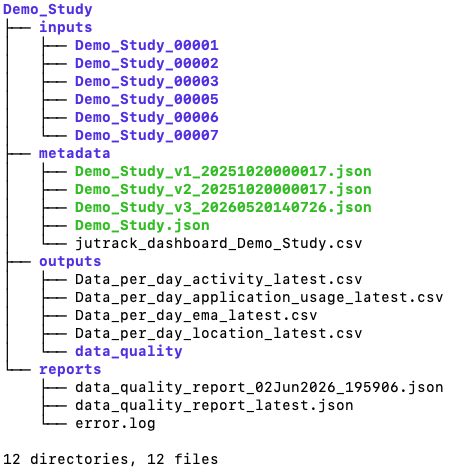
Data Sources
The platform collects three primary categories of data:
Smartphone sensor data
EMA questionnaire responses
Wearable device data (e.g., Garmin)
Each data source is stored independently and linked through the participant identifier.
Smartphone Sensor Data
Smartphone sensors generate timestamped JSON records. Each sensor type produces its own data structure depending on the information collected.
Example: Activity Recognition
{
     "activityType": "WALKING",
     "confidence": 100.0,
     "deviceid": "fa95d3-9d74-4c4f-8def-8bee65276",
     "sensorname": "activity",
     "studyId": "Demo_Study",
     "timestamp": 1690969600686,
     "username": "Demo_Study_00001_1"
 }
Example: Application Usage
{
     "appName": "Quickstep",
     "beginTimeStamp": 1690969205734,
     "endTimeStamp": 1690969486927,
     "lastTimeUsed": 1690969262708,
     "totalTimeinForeground": 32446,
     "deviceid": "fa62d3-9d74-4c4f-8def-8be6e65276",
     "sensorname": "application_usage",
     "studyId": "Demo_Study",
     "timestamp": 1690969606410,
     "username": "Demo_Study_00001_1"
 }
Example: Location
{
     "accuracy": 20.0,
     "alt": 32536.115439935587,
     "lat": 50.5519819674761,
     "lon": 6.319306026624161,
     "provider": "fused",
     "deviceid": "fa562d3-9d74-4c4f-8def-8b3b665276",
     "sensorname": "location",
     "studyId": "Demo_Study",
     "timestamp": 1690969600504,
     "username": "Demo_Study_00001_1"
 }
EMA Data
EMA responses are stored as timestamped question-answer records.
Example:
{
     "username": "Demo_Study_00001_1",
     "studyId": "Demo_Study",
     "subjectId": "",
     "deviceid": "f562d3-9d74-4c4f-8def-8b365276",
     "questionId": 1,
     "answerId": 1,
     "timestamp": "1778938864409",
     "answerText": null,
     "answer": null,
     "freeText": "Sehr beeinträchtigt",
     "sensorname": "ema",
     "startTime": "1778938782793",
     "endTime": "1778938781362",
     "surveyVersion": 12,
     "databaseId": 44232
 }
Garmin Wearable Data
Garmin devices can provide physiological and activity-related measurements, depending on the device model and enabled sensors.
Example: Heart Rate
{
     "deviceName": "vívoactive 6",
     "deviceid": "aaac108-2886-4d1c-85ed-8f154ecf22",
     "frequency": "15m",
     "id": 9,
     "studyId": "Demo_Study",
     "timestamp": 1779139800000,
     "timestamp_end": 1779140699999,
     "timestamp_start": 1779139800000,
     "username": "Demo_Study_00001_1",
     "value": 81.0,
     "sensorname": "garmin",
     "wearable_sensor": "HEART_RATE"
 }
Example: Respiration
{
     "deviceName": "vívoactive 6",
     "deviceid": "aac108-2886-4d1c-85ed-870f4ecf22",
     "frequency": "15m",
     "id": 12,
     "studyId": "Demo_Study",
     "timestamp": 1779139940000,
     "timestamp_end": 1779140839999,
     "timestamp_start": 1779139940000,
     "username": "Demo_Study_00001_1",
     "value": 13.0,
     "sensorname": "garmin",
     "wearable_sensor": "RESPIRATION"
 }
Example: Steps
{
     "deviceName": "Forerunner 255",
     "deviceid": "520dd6-2889-4385-bf-9f15f1214001",
     "frequency": "15m",
     "id": 38,
     "studyId": "Demo_Study",
     "timestamp": 1779213600000,
     "timestamp_end": 1779214499999,
     "timestamp_start": 1779213600000,
     "username": "Demo_Study_00001_1",
     "value": 24.0,
     "sensorname": "garmin",
     "wearable_sensor": "STEPS"
 }
Data Export
JDash provides functionality to export both raw and processed study data.
Raw Data Export
Raw exports contain the original JSON records collected from smartphones, wearable devices, and EMA questionnaires. These exports preserve the original data structure and timestamps as recorded by the JTrack applications.
Examples include:
Smartphone sensor records
EMA questionnaire responses
Garmin wearable measurements
Processed Data Export
Processed exports transform raw records into tabular CSV files suitable for quality control, reporting, and downstream analysis.
Currently available exports include:
Data-per-day summaries per subject
Additional processed export formats will be added in future releases.
Note
Processed CSV files are generated from the underlying raw JSON records and may include derived metrics, aggregations, or quality-control indicators depending on the selected export type.